
Ideogram 4.5 vs ChatGPT Images. What 100 edits show.
100 edits in a row on one photo. ChatGPT's fell apart by round 50.
Ideogram's held, with two catches.
Is Ideogram 4.5 better than ChatGPT for editing images?
For editing the same image more than a few times, yes. GPT Image 2.5, the model behind ChatGPT Images, redraws the whole picture on every edit, including the parts you did not ask it to touch. Each redraw adds a small color shift and some noise, and when you edit the result again, those errors stack. Ideogram 4.5 restores the pixels you left alone.
One edit looks fine in either. Ten edits in a row and ChatGPT's sky starts to blotch. ChatGPT still drew printed text on the shirt more cleanly, so the better choice depends on the step: ChatGPT to create a new element, Ideogram or your own composite to keep the rest of the image intact.
Ideogram vs ChatGPT: the 100-edit test
Alec Wilcock, who runs social media at ElevenLabs, posted the comparison on X on October 1, 2026, the day after Ideogram released 4.5.
He started with one photo of himself on a balcony above a harbor and wrote 100 prompts that each change only the T-shirt, such as "Change his T-shirt to a black T-shirt with the number 42 printed large in white in the middle of the chest." Each model edited its own previous output, never the original. GPT Image 2.5 Sunburst ran at high quality and Ideogram 4.5 Precise Edit at medium, both at 2,048 pixels.
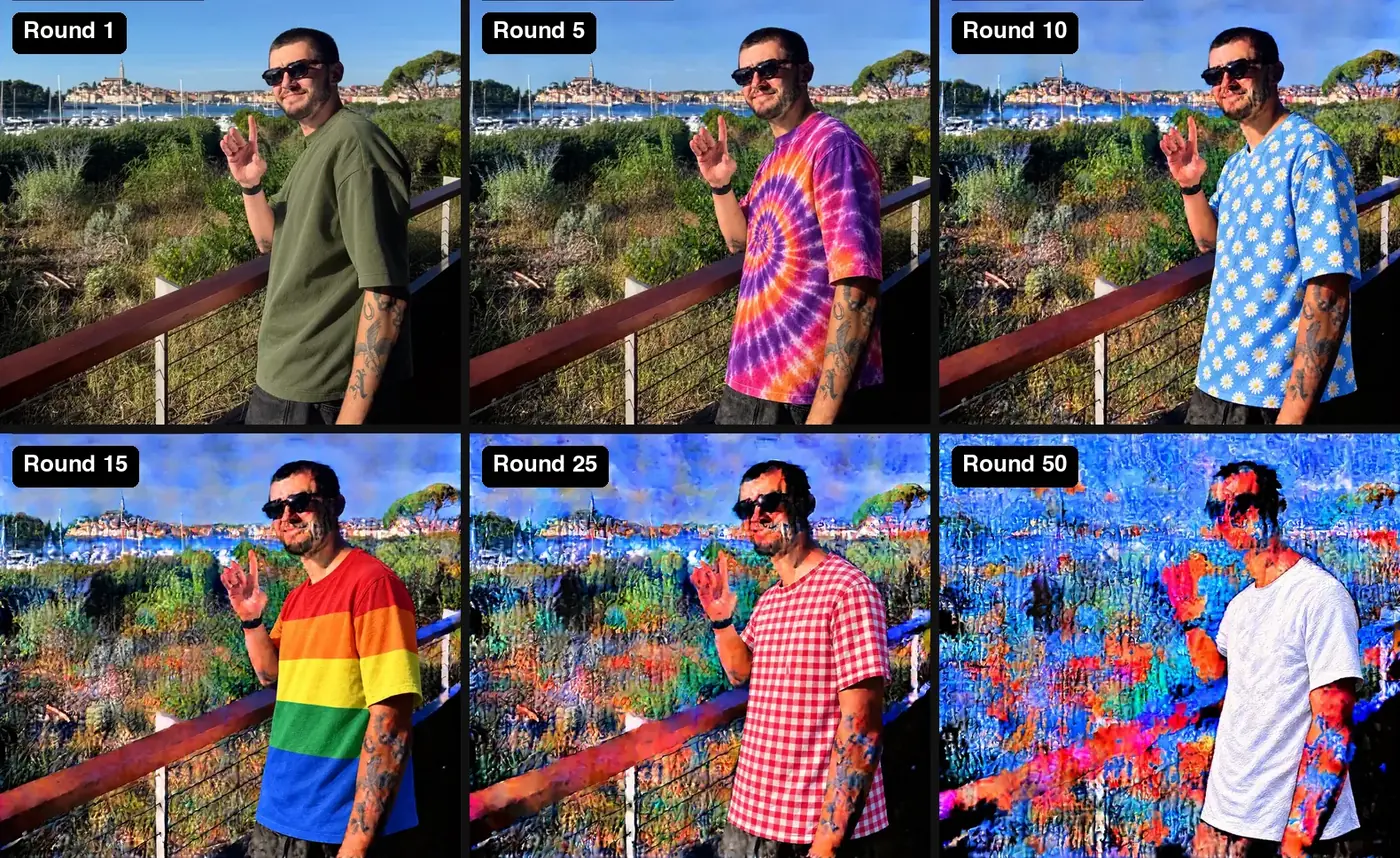
GPT Image 2.5's first edits look right, apart from slightly heavier color. By round 10 the sky has blotches. By round 15 the bushes look painted, and by round 25 the harbor is hard to read. At round 50 the background is noise and his face is breaking up. At round 100 his head is gone. Ideogram's background at round 100 is still close to the original photo.
It is one photo and one run, posted by one person, with the two models at different quality settings. OrcaRouter's launch writeup notes that no independent test has measured drift across repeated edits yet. Wilcock's own guess is that Ideogram is "likely just simple masking/in-painting."
Why does ChatGPT degrade images when you keep editing?
GPT Image 2.5 does not copy the pixels you left alone. It generates a new image that resembles the old one, with your change in it.
That new image is close, not exact. Each pass shifts color a little, sharpens or smooths texture, and fills fine detail with something plausible. On a single edit you will not see it. The next edit takes that output as its input, so it reproduces the earlier errors and adds its own. In this test, 50 rounds of that was enough to replace the background.
Ideogram's launch post names the problem directly: "With each edit, leading models add artifacts, pixel shifts, and color changes." Its answer is to change only the requested area and restore every other pixel from the input. Tibor Blaho's summary adds that it can edit a crop of a high-resolution image and stitch the result back into the original without downsizing it.
A mask does not fully solve this on OpenAI's side. The model page lists inpainting as supported, and the image edit endpoint accepts a mask, but OpenAI's image generation guide says masking with GPT Image is prompt-based: the model uses the mask as guidance and may not follow its exact shape. The pixels outside the mask can still move.
| GPT Image 2.5 Sunburst | Ideogram 4.5 Precise Edit | |
|---|---|---|
| Released | September 8, 2026 | September 30, 2026 |
| Pixels you did not ask to change | Regenerated on every edit | Restored from the input |
| Background in the test | Noise by round 50 | Close to the original at round 100 |
| Printed text in the test | Clean on every shirt shown | Cut off on several shirts |
| Edge of the edit area | No edge, the whole image changes | Drifts slowly over many rounds |
Where Ideogram 4.5 still falls short
Restoring untouched pixels keeps the background stable. The area that does change still has two problems you can see in the same test.
Printed text gets cut off
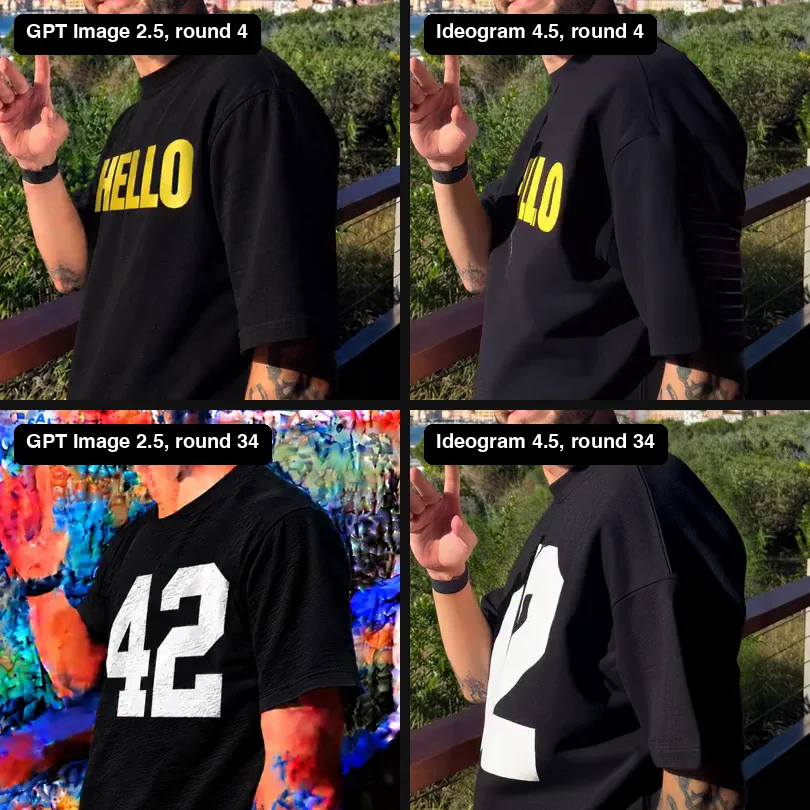
Ideogram's HELLO lost its H, its 42 became part of a 2, and its SUNDAY lost letters. In each case the print stops at a hard line partway across the chest. That looks like the edge of the area the model allowed itself to change, though Ideogram has not said how it picks that area. GPT Image 2.5 drew all three prints cleanly, on a background that was already breaking down.
The edges drift
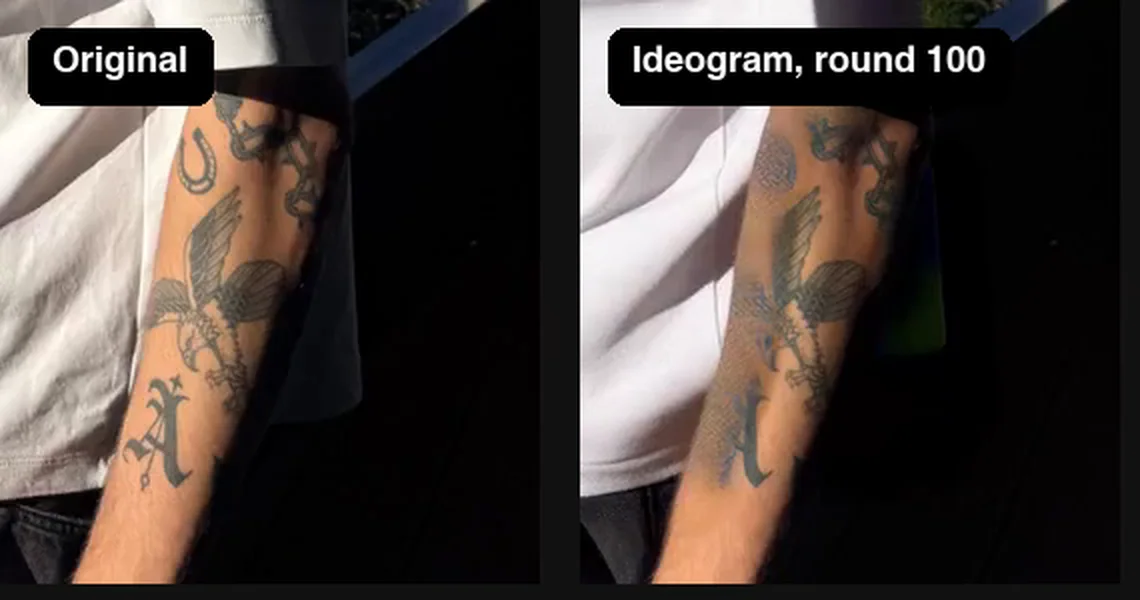
Wilcock pointed out that the bush behind his shoulder slowly turns into a line, and his tattoos fade on the side of the arm closest to the T-shirt. The strip along the boundary of the edit area gets redrawn every round, so it degrades the way GPT Image 2.5's whole frame does, only slower and in a narrower band. By round 100 the horseshoe tattoo near his sleeve is gone.
How to edit ad creative with AI without drift
Ad creative goes through rounds: a new color, a new headline, a new product shot, a resize for each placement. Set the process up so every round starts from a clean file.
- Make variants from the master, not from each other. Generate every variant from the approved original, not from the last variant. Wilcock chained edits on purpose to show the worst case. Most teams chain by accident, by downloading the latest output and editing it again.
- Paste the original back. Put the AI result on a layer above the original and mask it to the area you meant to change. In Photoshop that is a layer mask. In a script it is a composite with the same mask you sent the model. Everything outside the mask is then the original file, pixel for pixel, whichever model you used.
- Pick the model for the step. In this test GPT Image 2.5 drew printed text better and Ideogram 4.5 kept the rest of the photo. Use the first to create the new element and the second, or your own composite, to put it into the finished image.
- Check faces, hands, text, and logos at full size every round. Drift in those areas is easy to miss in a thumbnail grid and easy to spot on a phone screen.
- Save every round with its prompt. When a variant drifts, go back to the last clean round instead of trying to repair the broken one.
Wilcock wrote that he plans to try running the restoring approach on every frame of a video. He has not posted results yet. If you try it, expect the edge drift above to show up as flicker along the edit boundary, and test a few seconds before committing a whole cut.
Frequently asked questions
Why does AI image editing change parts of the image I didn't ask it to?
Most image models, including GPT Image 2.5, regenerate the whole picture on every edit instead of copying the pixels you left alone. Each pass shifts color and texture slightly. On one edit you rarely see it, but when you keep editing the output, the changes stack.
What is the best AI image generator for editing photos?
It depends on the edit. In the October 2026 test, Ideogram 4.5 Precise Edit kept the rest of the photo intact across 100 edits, while GPT Image 2.5 in ChatGPT drew cleaner printed text but degraded the background within about ten chained edits. For repeated revisions of one image, Ideogram held up better; for creating a new element with text, ChatGPT did.
Does GPT Image 2.5 support masks?
Yes. OpenAI lists inpainting as supported and the image edit endpoint accepts a mask. OpenAI's guide says masking with GPT Image is prompt-based guidance and may not follow the mask's exact shape, so pixels outside it can still change. Composite the original back over the result to lock them.
Is Ideogram 4.5 better than GPT Image 2.5 for editing?
For editing the same image many times, it held up far better in the 100-edit test, because it restores the pixels you did not ask to change. GPT Image 2.5 rendered printed text more cleanly. Many teams will want both: one to create the new element, the other or a manual composite to place it.
How many edits before an AI image starts to degrade?
In the October 2026 test, GPT Image 2.5 Sunburst showed blotches in the sky by round 10 and had lost the background by round 50 when each edit built on the last. That is one photo at one setting; other images will differ. Editing every variant from the original avoids the problem.
What is inpainting?
Inpainting is editing only a selected area of an image and leaving the rest. The area is usually given as a mask. Whether the rest truly stays untouched depends on the model, which is why the 100-edit test split so sharply.
Producing ad creative in rounds?
Growthr's in-house creative team has performance-tested more than 5,000 creatives and ships variants in weekly sprints, each judged on down-funnel CPA.
Related: Creative production · Video production · What is Jev?