
How do you win Google's "official site" slot and Preferred Sources? What the October 15 AI Mode update changed, and the playbook for each new link.
On October 15, 2026 Google announced five changes to AI Mode and AI Overviews: more inline links shown higher, a test of a dedicated "official sites" section at the top of some answers, carousels of recent articles that highlight each user's Preferred Sources, bigger related-article links with thumbnails, and clickable creator names on video results. Google published no data on whether any of it sends more clicks. Here is what each change rewards, and what to do about it this quarter.

 What changedOct 15, 2026




 The one number Google gavePreferred Sources
No baseline, no user count, no click or traffic data. Google's words: "has grown by more than 7x since the start of the year."
 What earns each slotShort version
What changed, and why it matters to a marketer
Every one of the five changes adds a clickable link to an AI answer that did not have one, or moves an existing link somewhere people are more likely to see it. That is the whole reason to care. AI answers have been taking the click; Google is now adding more places inside the answer for your page to win it back.
The announcement, "More ways to connect with the web from Search" by Hema Budaraju, VP of Product Management, lists the five:
- Inline links, shown higher. Google says it has made "continued and substantial increases to the presence of inline links" and is launching updates to show them "higher up in responses more frequently." This is a rollout.
- An "official sites" section. For cases where "there are only one or two official places on the web to complete a specific task or get the exact info you need," Google "will be testing a new display" that surfaces those links "in a dedicated section at the top of a response, with context about why each link is useful." This is a test.
- Carousels of recent articles, with Preferred Sources. The prominent carousels for timely articles are "starting to roll out" to "additional locations and languages globally," and they "highlight your Preferred Sources." Google says Preferred Sources use "has grown by more than 7x since the start of the year."
- Bigger related-article links. The links at the end of some AI responses get "image thumbnails and a more clickable design."
- Clickable creator and publisher names on video results in AI Mode, linking to their Search profiles. Google says "this week, we started testing" it.
Two things are missing from the post. Google gave no numbers on clicks, traffic, or how often any of these displays appear, and it named no countries for the tests. Anyone telling you the update "sends more traffic to websites" is guessing. Google added more link surfaces and has not said what they do yet.
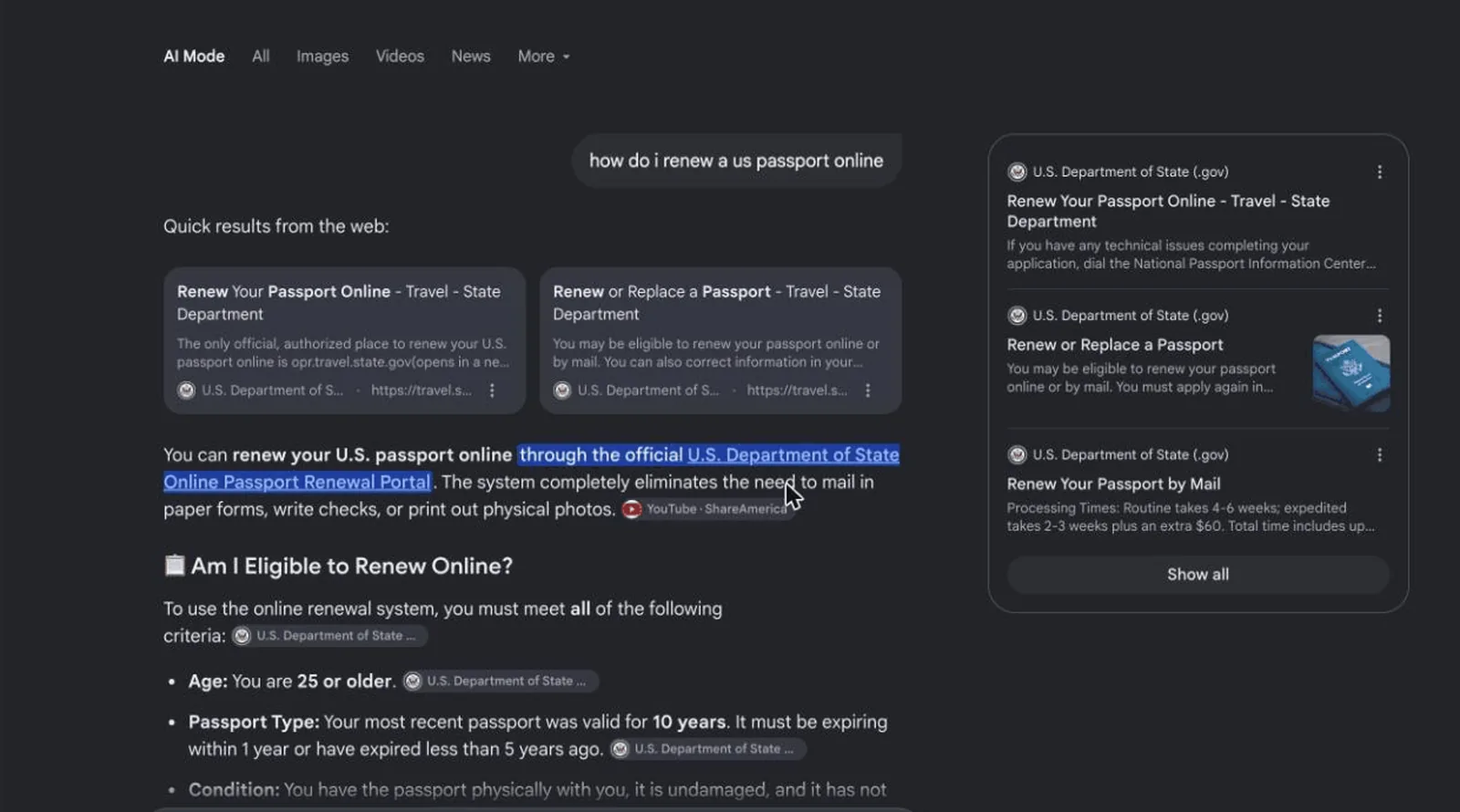
How to become the "official site" for a task
Google's own example is an airline refund: the section shows the refund form and the refund rulebook, with a line explaining each. It is triggered by a task, and it links the page where the task is done. So the work is to have that page, one per task, and to make it unmistakably yours.
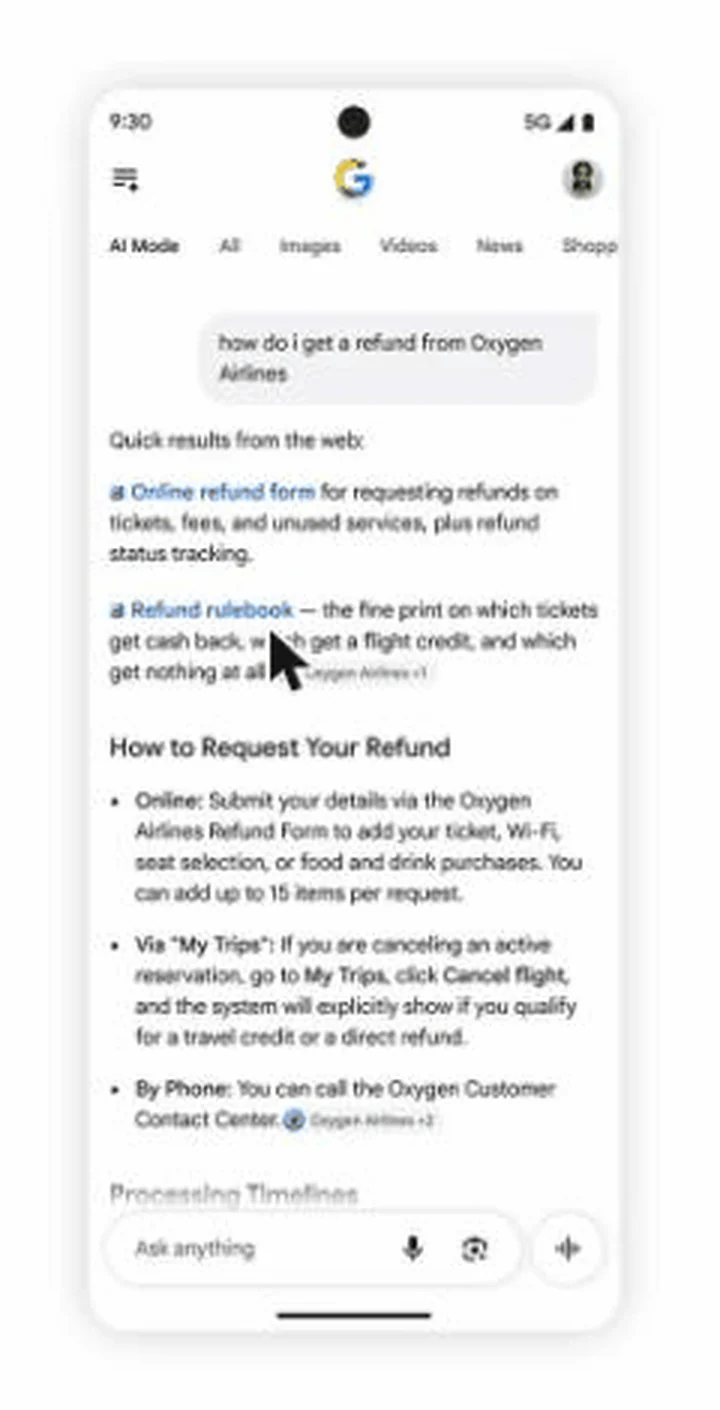
Entity clarity: Google has to know the page is the official one
An "official" link only works if Google can connect the page to the organisation the user asked about. That connection is built from the same signals a Knowledge Panel is built from, and most company sites are missing pieces of it. When we scanned 640 company websites in September, between 85% and 98% of every industry lacked parts of the structured block that states who the company is, where it is, and which profiles are its own. Fix that first:
- One
Organizationschema on the homepage with the legal name, the logo, the address, and asameAslist pointing at every profile you control: LinkedIn, X, YouTube, Instagram, Crunchbase, Wikidata if you have an entry, the app stores if you have apps. - The same name everywhere. The name in schema, in the footer, in the title tag pattern, in the app store listing, and on the social profiles should match character for character.
- Links back. Each of those profiles links to the domain, so the graph closes in both directions.
- Claim the Knowledge Panel if one exists, and the Search profile if you are eligible (below). Both are Google's own way of letting you say "this is us."
Task-completion pages: one page per task, the action at the top
Look at what Google chose to show: a form and a rulebook. Not a help-centre home, not a blog post about refunds. The display rewards the page where a specific task is completed or a specific fact is stated. Go through the tasks your customers actually search for with your name attached, and for each one check that a single page exists, that its title names the task, and that the action or the answer is in the first screen rather than after four paragraphs of context.
 Task-page audit0 / 6
- List the branded task queries. In Search Console, filter queries containing your brand name and sort by impressions. "Cancel", "refund", "pricing", "login", "status", "contact", "return", "how to" will be near the top. Each is a task.
- Map each task to exactly one URL. If two pages half-answer it, pick one and redirect or canonicalise the other.
- Put the task in the title and the H1. "Request a refund" beats "Help & Support".
- Put the action in the first screen. The form, the button, the number, the dates. Context goes below it.
- Write the one-line description Google will need. The official-sites display shows context about why each link is useful; your meta description and first paragraph are the obvious sources for it.
- Keep it indexable and snippet-eligible. Google's AI features guidance says there are no extra requirements beyond being indexed and eligible for a snippet. A
nosnippettag or a login wall takes the page out of the running.
Structured data: label what the page is
No schema type is required for any of the five displays; Google's AI features guidance says no new markup is needed. Schema still tells Google what a page is, which is what the official-sites logic has to decide. Use WebPage on task pages, Article with datePublished and author on anything that could enter a news carousel, and VideoObject where you host video.
Official brand signals: make the claim in places Google verifies
Three of Google's own surfaces let an organisation say it is the official source. The Knowledge Panel claim verifies ownership through a linked official channel. The Search profile, launched for US publishers and creators in June 2026, sets the avatar, bio, website, and linked platforms Google shows for you; Google's bar is a sizable following on at least one major platform, and the thresholds have moved since launch, so check the eligibility page. Google Business Profile does the same for a location. None is a ranking input; they are the fields Google reads when deciding whose link to label "official."
Earning the inline link
Inline links are the links embedded in words or phrases of the answer itself. Google says there are more of them and they are moving higher. The way to be one is unchanged from how AI Overviews pick sources: a heading worded as the question, the answer in two or three plain sentences directly under it, on a page that already ranks for the question. In the passport example above, the inline link in the first sentence goes to the portal where the task is done, because that is what the sentence is about. Write the sentence you would want quoted, put the link target it implies on your own site, and make the page say it first.
Getting selected as a Preferred Source
This is the only one of the five you can act on directly today, because the mechanism is a reader ticking a box. The job is to get your readers to tick it, and to make sure your site is eligible to be ticked.
Preferred Sources launched in the US and India in August 2025 and now covers Top Stories in every language Google Search is offered in, per Google's Search Central documentation. Readers choose sources from the star icon beside Top Stories, or from Search personalization in AI Mode and AI Overviews, and a selection in one place applies to the other. Once selected, your content is more likely to appear in Top Stories with a "preferred" badge, and it can carry the same badge in AI Mode and AI Overviews for that reader, provided your site is included in Search's generative AI features in Search Console. Google's launch post adds the condition that matters: preferred sites appear prominently "when those sources have published fresh and relevant content for your search."
Three rules decide whether you can be selected at all, all from the Search Central page:
- Only domains and subdomains are eligible.
news.example.comqualifies;example.com/blogdoes not. If your articles live in a subdirectory, the whole domain is the source, and it has to look like a publisher. - Sources that are not updated regularly may be unavailable. Google's help page says this outright. A blog that posts quarterly will not appear in the picker.
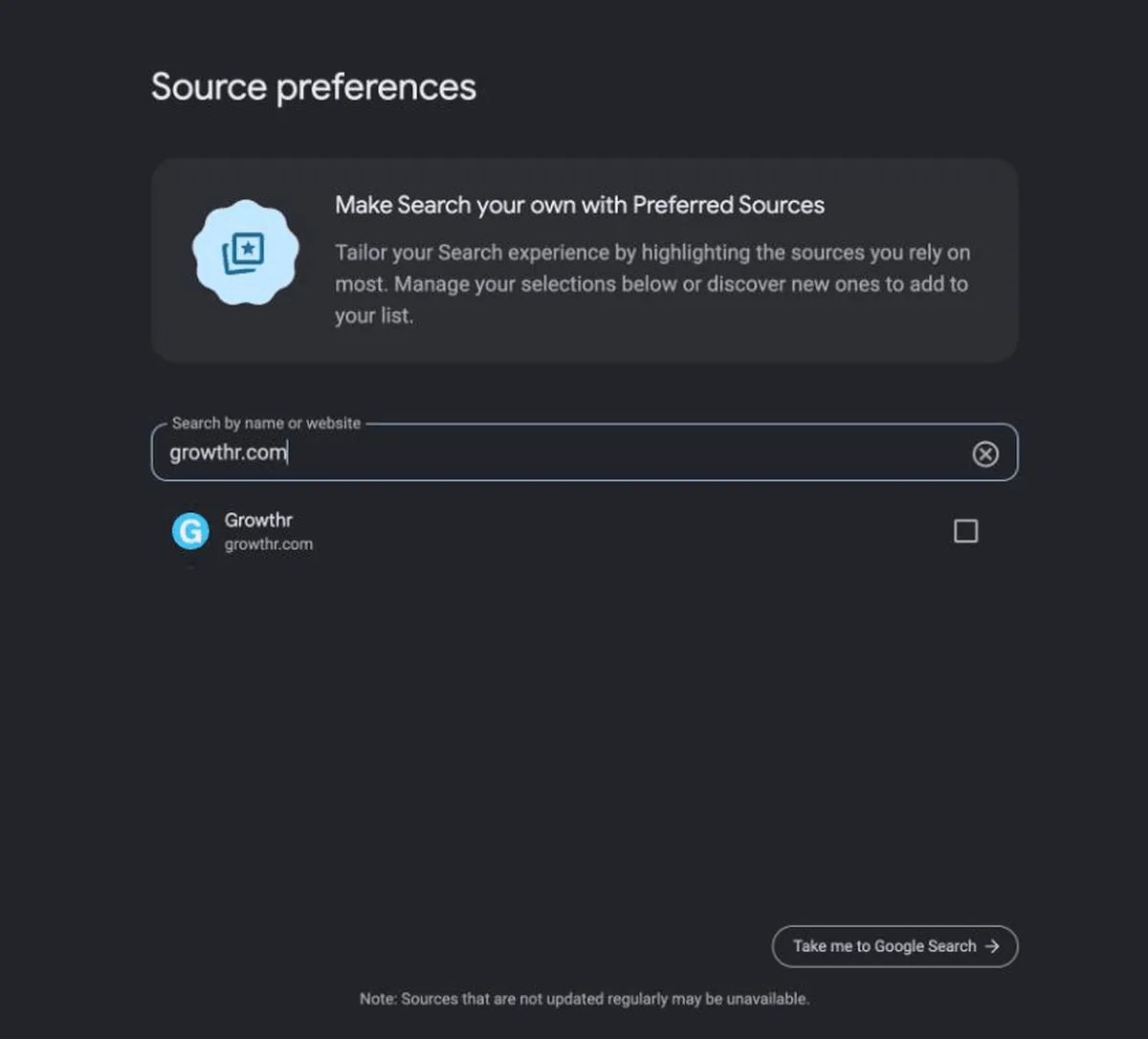
- Check that you appear before you promote it. Open
google.com/preferences/source?q=yourdomain.comand search for yourself. If nothing comes up, fix cadence and eligibility first.
Then ask. Google provides a button and a deeplink for exactly this; using them is optional and does not affect whether you can be selected, but a reader who never sees the box never ticks it.
 Preferred-source prompts, from Google's documentation
# Standard button (recommended): add the script, then the div where the button should render <script async src="https://news.google.com/swg/js/v1/publisher.js"></script> <div google-add-preferred-source-btn></div> # Deeplink for places that cannot run JavaScript: newsletters, social bios, app settings https://www.google.com/preferences/source?q=yourdomain.com
Snippets as shown on Google's Search Central page, last updated September 18, 2026 and read October 20, 2026.
Where to put it: the end of every article, the newsletter footer, the "follow us" row on social profiles, and the thank-you page after a signup. The readers most likely to tick the box are the ones who just finished something of yours.
News freshness: the carousel needs something recent to show
The carousels show "timely articles," and the preferred badge appears when a source has "published fresh and relevant content." A company blog can qualify, but only if it behaves like a publication: a real publish date on every article, a dateModified that changes only when the content does, a sitemap with accurate lastmod values, and a cadence Google can see. Dates are the part most company sites get wrong; in our September scans, between 39% and 61% of sites per industry had no dates in their sitemaps at all. Google compares crawls, so a date bumped on unchanged text costs trust in every date on the site.
Search profiles for creators and video
The fifth change links a creator's or publisher's name on an AI Mode video result to their Search profile. If your video runs through a founder, a host, or an artist, that person's profile is now a surface inside AI answers. Claim it, fill in the website and linked platforms, and keep the channel name consistent with it. The same goes for the creators you pay to post.
What this looks like by vertical
Fintech
The tasks are account-level: close an account, dispute a charge, download a 1099, change a linked bank. Each needs its own page with the action at the top, because a third-party guide that ranks for "cancel [your app] subscription" is a page the official-sites display would otherwise have to choose instead of yours.

Music
For an artist or label, the official pages are tour dates, tickets, and the release itself, and the Search profile is the artist's. Fan sites and ticket resellers compete for the same slot; the artist's site wins it by being the page the task is done on, with the dates and the ticket links first.
Gaming
Patch notes, server status, and the support form are the official sources. A studio that posts patch notes on a dated news section with a sitemap is a candidate for the recent-articles carousel on the game's name; the same notes buried in a Discord are not.

B2B and enterprise
Pricing, documentation, the status page, and the security or trust page are the tasks. The common failure is that docs live on a subdomain with no Organization link back to the company, so Google has to guess they are official. One schema block and a footer link fixes it.
How to tell whether any of it worked
Google has not said what these displays do to clicks, so measure it yourself. For each task page, compare 28 days before and after on its branded task queries in Search Console: position should hold, and click-through rate is the number to watch. Google gives no count of readers who selected you as a Preferred Source, so track clicks on the button or deeplink as the proxy.
Frequently asked questions
What is the "official sites" section in Google AI Mode?
A display Google announced on October 15, 2026 and is testing in its Search AI experiences. When there are only one or two official places on the web to complete a task or get specific information, those links appear in a dedicated section at the top of the response, each with context on why it is useful. Google's example is an airline's refund form and refund rulebook.
How do I get my site selected as a Google Preferred Source?
Readers select sources themselves, from the star icon beside Top Stories or from Search personalization in AI Mode. Your site has to be a domain or subdomain, not a subdirectory, and has to publish regularly, or it may not appear in the picker. Check that it appears at google.com/preferences/source, then ask readers to add you using Google's button or the deeplink with your domain in the q parameter.
Does Google's October 2026 AI Mode update send more clicks to websites?
Google has not said. The announcement describes more inline links shown higher, an official-sites test, wider rollout of article carousels, more prominent related links, and clickable creator names, but gives no click, traffic, or frequency data. The one figure it gives is that use of Preferred Sources has grown more than 7x since the start of 2026.
Do I need special schema markup to appear in AI Overviews or the official sites section?
No. Google's guidance on AI features says a page needs to be indexed and eligible to show a snippet, with no additional markup or files. Organization schema with a sameAs list still helps Google connect a page to the company it belongs to, which is what an "official" label depends on.
Who can get a Google Search profile?
Publishers and creators in the US with a sizable following on at least one major social or video platform, per Google, who must also be 18 or older. Google launched the profiles in June 2026 and has adjusted the follower thresholds since, so check Google's eligibility page for the current numbers. A profile lets you set the avatar, bio, website, and linked platforms Google shows, and it is what the new clickable creator names in AI Mode video results link to.
Want to know which of your pages Google would call official?
The $99 strategy call is a live teardown of your site: entity signals, task pages, dates, and a Search Console read of the branded task queries. The fee credits toward Boost if you want it implemented.
Related: How to rank in Google AI Overviews · Are AI crawlers blocked on your site? · GEO agency services · SEO + GEO services